 USU CIDI
USU Design Tools Training
1.3: Syllabus Tool
The Syllabus tool provides preformatted section headings and content. Preformatted content includes:
- Institution-defined objectives
- Bloom's Revised Taxonomy terms
- The Canvas course grade scheme
- Institutional policies and procedures
Launch the Syllabus tool by opening the Syllabus page for editing, and then clicking the Launch USU Design Tools button.
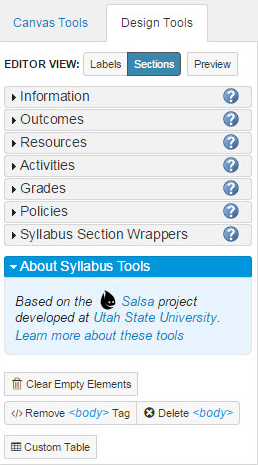
| Section | Function |
| Information | Adds an information section to the syllabus. An information section contains course information such as title, number, term, and instructor. |
| Outcomes | Add an outcomes section to the syllabus. Outcomes are statements created to define and measure desired student behavior. |
| Resources | Adds a resources section to the syllabus. Learning resources are materials provided to achieve learning outcomes. |
| Activities | Adds an activities section to the syllabus. Activities are opportunities for students to gain or demonstrate knowledge and skills. |
| Grades | Adds a grades section to the syllabus. The Grades moves existing assignment details from the bottom of the page into the syllabus body. |
| Policies | Adds a policies section to the syllabus. Policies inform the students of the teacher’s expectations and practices. |
| Syllabus Section Wrappers | Adds new or predefined section headings. Rearranges the order of sections on the page. |
For more information on the Syllabus tools, see Chapter 4, "Using the Syllabus Tool."